Seat one crown in every row, column and coloured realm — and never let two crowns touch. 60 handcrafted boards, each with exactly one solution.
About Queens Court
Queens Court is a crown-placement logic puzzle in the spirit of the classic queens grid. Each board is split into coloured realms, and your job is to seat exactly one crown in every row, every column and every realm — with the extra twist that no two crowns may ever touch, not even at the corners. There is no guessing here: all 60 boards are verified to have exactly one solution, so every crown can be found by pure deduction.
The rhythm is what makes it moreish. You pencil in little X marks to fence off impossible squares, spot the realm that has only one square left, drop the crown, and watch three more rows suddenly resolve themselves. When a single-square realm hides in a corner, finding it first can crack half the board in one move. Conflicts glow red the instant you make them, so you always know when a line of reasoning has gone wrong.
Boards grow from a gentle 6x6 to a properly knotty 10x10, with a timer and best times for replaying old realms faster. It suits anyone who likes sudoku-style deduction but wants rounds that finish inside a coffee break.
Inside Queens Court: what we checked
The numbers below come from Queens Court's own source code, and the screenshots are from our own test run of the game (20 October 2026).
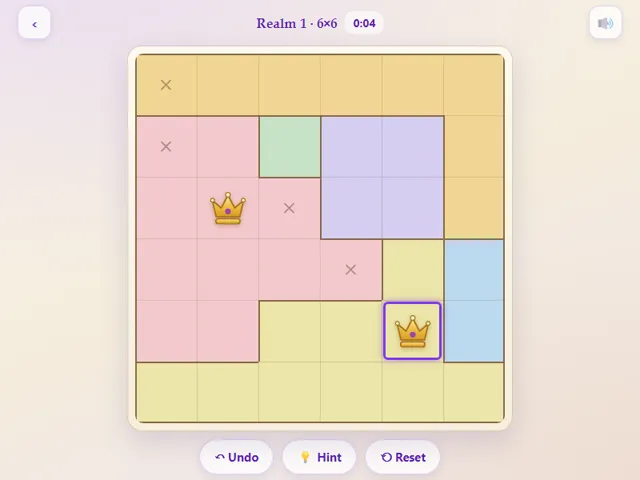
- There are 60 realms in five sizes: 6 × 6 (realms 1 to 10), 7 × 7 (11 to 22), 8 × 8 (23 to 38), 9 × 9 (39 to 50) and 10 × 10 (51 to 60).
- Every realm was generated in advance and checked to have exactly one solution, so you never need to guess.
- Tapping a cell cycles through empty, an X mark, then a crown. The X is just a note to yourself and does not count as a crown.
- Crowns that break a rule (same row, column or colour, or touching each other, diagonals included) are flagged straight away, and the realm is won when you have one crown per row with no conflicts.
- The Hint button places one correct crown, removing any of your crowns that clash with it. Stars depend on hints: none gives three stars, one gives two, and two or more gives one.
- A timer runs on every realm. Your best time and best stars for each realm, and how far you have unlocked, are saved in this browser. U or Z undoes, R resets and H is a hint.
Unblocked Chromebook No Download Mobile For Kids Brain Games
How to play Queens Court
Tap a square to cycle it: empty, then an X note, then a crown. Place one crown in every row, column and coloured realm so that no two crowns touch, even diagonally. Conflicting crowns pulse red — clear them before the board will count as solved. Finish a realm to unlock the next one.
Controls
Desktop: click to cycle a square, arrow keys + Enter/Space to move and mark, U undo, R reset, H hint, M mute. Touch: tap squares and the on-screen buttons.
Tips & tricks
- Hunt for the smallest realm first — a realm with only one or two squares often forces a crown immediately.
- Use X notes aggressively: every crown you place rules out its whole row, column and all eight neighbours.
- If a realm lives entirely inside one row or column, that row or column's crown must come from it — X out the rest.
- Stuck on a big board? Undo back to your last certain crown instead of resetting the whole court.
Frequently asked questions
Does Queens Court save my progress?
Yes — Queens Court saves your progress and settings in this browser's local storage, so you can pick up where you left off on the same device. Nothing is uploaded and no account is involved — clearing your browser data is what resets it.
Is Queens Court unblocked at school or work?
Queens Court is a plain web page of about 37 KB — no plugin, no installer, no app store — so it loads on a Chromebook or a locked-down school or office laptop the same way any other page does, and the whole game arrives in one short download. Whether it opens comes down to your network's filter rather than the game itself.
Who made Queens Court?
Queens Court was built in-house by the 360 PlayZone team using open web technology (HTML5), which is why it runs instantly without any download.