
Play Mahjong Connect online free. Link two matching tiles with a clear path that bends at most twice, watch the line snap between them, and empty six growing boards before the timer runs dry.
About Mahjong Connect
Mahjong Connect is the flat cousin of tile solitaire. There is no stack to dig through — every tile lies open in a grid, and the whole puzzle is about the space between them. Two tiles clear when they carry the same symbol and a free lane joins them: a straight run through empty cells that is allowed to turn a corner twice and no more. The moment you tap the second tile the route lights up and traces itself, which is the part that makes the game click. You stop reading the tiles and start reading the gaps.
The rule that changes everything is that the lane may leave the board. A path can slip off the edge, run down the outside and come back in, so two tiles sitting in opposite corners of the top row are joined the instant nothing stands between them and the border. That makes the outer ring the cheap side of the board and the middle the expensive one, and it is why clearing edges early tends to unpick the whole grid. Every symbol appears four times, so a pair you cannot connect is rarely the only pair you have.
Six boards run from forty tiles up to ninety-six, and the grid reshapes itself to your screen — tall on a phone held upright, wide when you turn it. A bar drains the whole time; each match hands a little of it back, and matches made close together stack a combo. Hints and shuffles are there when the board goes flat, but both cost seconds, and if a board ever runs out of legal moves it reshuffles itself for free.
Inside Mahjong Connect: what we checked
The numbers below come from Mahjong Connect's own source code, and the screenshots are from our own test run of the game (20 October 2026).

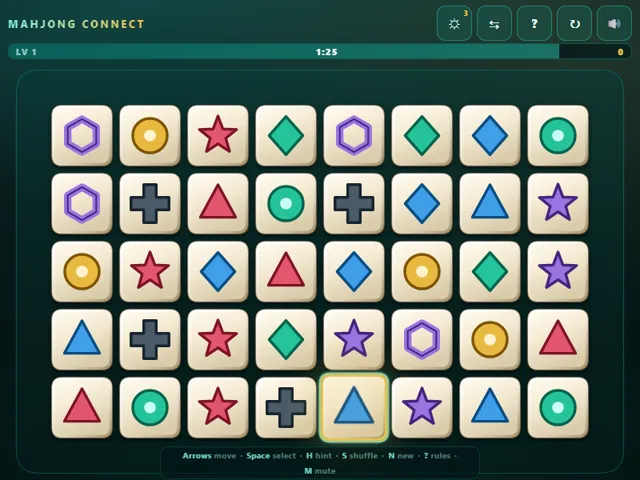
- The levels have 40, 48, 60, 72, 84 and 96 tiles, and every level after the sixth stays at 96. The time allowed is 2.4 seconds per tile minus 5 seconds for each level above the first, so level 1 gives 96 seconds and level 6 about 205.
- A match needs the same symbol in the same colour, and the path joining the two tiles may take at most two turns through empty squares. It may also run around the outside of the board, which is why tiles on the edge are easy to clear.
- Every match gives 1.2 seconds back. A hint costs 6 seconds and you get 3 per level, and a manual shuffle costs 8 seconds. If no match is left the board reshuffles itself for free.
- Matches made within 3 seconds of each other build a combo. A match scores 100, plus 40 for every step of combo after the first (the bonus stops at the tenth step), and the total rises 10% for every level above the first. Clearing a level adds 100 times the level plus 5 points per second left.
- Your best score, furthest level, total matches and levels cleared are saved in this browser.
Solitaire Mahjong Unblocked Chromebook No Download Mobile For Kids Brain Games
How to play Mahjong Connect
Tap or click one tile, then tap the tile that matches it. The two clear only if they show the same symbol and a free path can join them, turning at most two corners and crossing empty cells only. The path is allowed to run around the outside edge of the board, so border tiles are usually the easiest pairs. Clear every tile before the time bar empties to move up a level. Use HINT to reveal one pair and SHUFFLE to relay the board, but both cost you seconds.
Controls
Desktop: click a tile to select it, click its twin to clear the pair. Arrow keys move the cursor, Space selects, H hints, S shuffles, N starts a new game, ? opens the rules and M mutes. Touch: tap one tile, then tap its match.
Tips & tricks
- Clear the border first. A path may run around the outside of the board, so two matching edge tiles are joinable almost by default, and emptying the ring opens the lanes the middle needs.
- Two bends is the whole rule, so read routes before you tap: a pair sharing a row or column needs nothing, a pair one corner apart needs one free cell, and anything that wants three turns is simply illegal no matter how close it looks.
- Every symbol is on the board four times, which is six possible pairings. When one pair looks blocked, check the other five before you spend eight seconds on a shuffle.
- When two matches are equally easy, take the one that finishes a whole column. An empty column cuts the board in half and gives every later pair a straight lane through the gap.
Frequently asked questions
Does Mahjong Connect save my progress?
Yes — Mahjong Connect keeps your best score and settings in this browser's local storage, so they are still there when you come back on the same device. Nothing is uploaded and no account is involved — clearing your browser data is what resets it.
Is Mahjong Connect unblocked at school or work?
Mahjong Connect is a plain web page of about 63 KB — no plugin, no installer, no app store — so it loads on a Chromebook or a locked-down school or office laptop the same way any other page does, and the whole game arrives in one short download. Whether it opens comes down to your network's filter rather than the game itself.
Who made Mahjong Connect?
Mahjong Connect was built in-house by the 360 PlayZone team using open web technology (HTML5), which is why it runs instantly without any download.