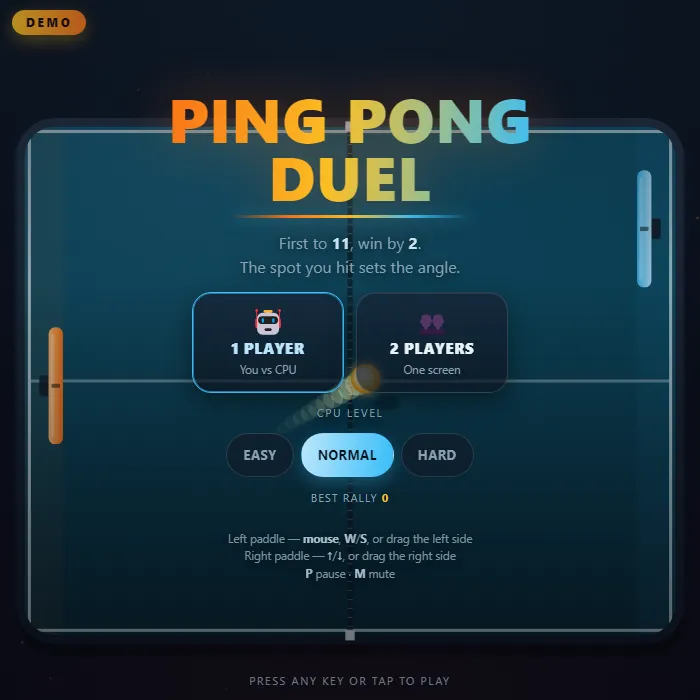
First to 11, win by two: a ping pong game online where the spot you hit sets the angle. Play the table tennis game solo against three CPU levels, or share one keyboard for 2 player ping pong.
About Ping Pong Duel
Ping Pong Duel is a top-down table tennis match played to 11, win by two, with the serve changing hands every two points and every single point once both sides reach 10. You take the orange paddle on the left and slide it up and down while the ball rebounds off the top and bottom rails, until someone misses and it crosses an end line. There are no shot buttons and no swing timing: where the ball meets your paddle is the whole shot.
That one variable carries the game. A ball struck on the centre mark comes back almost flat and fast; half a paddle-height off centre leaves at around thirty degrees; catch it on the very tip and the return goes out past sixty, trading a little pace for the angle. Your own movement counts too, because sweeping the paddle through the contact puts spin on the ball and bends its flight, while a parked paddle only ever returns a straight one.
Every return adds a few percent of pace, and the speed ceiling itself climbs the longer a rally runs, so a twenty-shot exchange finishes far quicker than the serve that started it. The three CPU levels differ mainly in what they can see: Easy never accounts for the ball turning off a rail and camps where it was originally heading, while Hard tracks five bounces ahead, reads spin and aims its reply at whichever half of the table you have left open. Two people can also share one keyboard, W and S against the arrow keys, or take half the screen each on a phone. Your longest rally carries over between sessions.
Unblocked Chromebook No Download Mobile Multiplayer
How to play Ping Pong Duel
Choose one player against the CPU or two players on one device, pick the CPU level, and the match opens on a three-count. Slide your paddle up and down to return the ball; it bounces off the top and bottom rails, and whoever lets it past their end line concedes the point. The serve alternates every two points. First to 11 takes the match, but you have to be two clear, so 10-10 goes to deuce and the serve then changes every point.
Controls
Desktop: in one player, steer the left paddle with the mouse, with W and S, or with the Up and Down arrows. In two player, W and S drive the left paddle while Up and Down drive the right, both on the one keyboard. P or Escape pauses, M mutes, R restarts the match, and Q leaves the pause screen for the menu; on the menu, 1 and 2 start a one or two player match. Touch: drag on your own half of the table to move your paddle, and in a duel both halves respond at once, a thumb each.
Tips & tricks
- The centre mark on your paddle is the flat, fast return and the tip is the wide one. Angle drags the CPU across the table, but an edge hit comes back slightly slower, so close points out through the middle of the bat.
- Keep the paddle moving through the contact instead of parking it where the ball will be. The paddle travel is what puts spin on the ball and curves its flight; a stationary bat only ever sends back a straight one.
- Easy never accounts for the ball turning off a rail, so it camps where the ball was heading before the bounce and a shot angled into the top or bottom wall wins outright. Normal looks three bounces ahead and Hard five, so that trick dies as you climb.
- On Normal and Hard the CPU aims at whichever half of the table your paddle has left open, and it decides that as it strikes. Sit near the centre line and move late, because drifting to one side early just tells it where to hit.
Frequently asked questions
How do you aim in Ping Pong Duel?
Where the ball hits your paddle sets the return: the centre sends it back flat and fast, the tip sends it out at a steep angle. Moving the paddle through the hit adds spin.
How do two players play Ping Pong Duel?
On a keyboard, one player uses W and S and the other uses the Up and Down arrows. On a phone, each player drags on their own half of the table.
Does Ping Pong Duel save my progress?
Partly. Ping Pong Duel keeps a running win/loss tally and your settings in this browser's local storage; there is no level progress to save. Nothing is uploaded and no account is involved — clearing your browser data is what resets it.
Is Ping Pong Duel unblocked at school or work?
Ping Pong Duel is a plain web page of about 60 KB — no plugin, no installer, no app store — so it loads on a Chromebook or a locked-down school or office laptop the same way any other page does, and the whole game arrives in one short download. Whether it opens comes down to your network's filter rather than the game itself.